
You’ve prepared for the interview. You’ve researched the company, know your resume inside out, and even picked out your outfit. Yet, that knot in your stomach lingers—the fear of the unknown, not knowing which questions will come or how you’ll perform under pressure. Using mock interview tools can give you that practice run, letting you rehearse answers to common questions. Practicing with mock interview tools helps you anticipate tricky questions and refine your responses. Regular sessions with mock interview tools build confidence, making the real interview feel familiar and manageable.
This guide is your personal training camp for interview success. We’ll explore the world of mock interview tools, review the best platforms available, and show you how to use these mock interview tools to transform your preparation. By practicing regularly with mock interview tools, you can turn nerves into confidence and approach any interview with a masterful performance.
What Are Mock Interview Tools?
Mock interview tools are software applications or web platforms that simulate a real job interview. They use artificial intelligence to ask you common interview questions, record your answers, and then provide detailed, data-driven feedback on both what you said and how you said it. Think of it as a flight simulator for your career.
The rise of these **interview preparation apps** is a direct response to the increasing use of AI and one-way video interviews in the actual hiring process. As companies use technology to screen candidates, applicants are now using the same technology to prepare. This trend is a key part of the future of work, where data and practice are becoming just as important as a well-written resume.

Why an Interview Simulator is Your Secret Weapon
Practicing with an AI coach offers a host of advantages that you can’t get from just rehearsing in front of a mirror.
It Provides Unbiased, Data-Driven Feedback
A friend might tell you your answer “sounded good,” but an AI can tell you much more. These platforms analyze objective metrics that are invisible to the naked eye:
- Speech Analytics: It can track your talking speed, your use of filler words (like “um” and “like”), and your overall tone of voice.
- Non-Verbal Cues: It can analyze your eye contact, posture, and facial expressions to see if you appear confident and engaged.
- Keyword Matching: It can even analyze the transcript of your answer to see if you’re using the key skills and qualifications from the job description.
It Builds Confidence and Reduces Anxiety
The fear of the unknown is a major source of interview anxiety. A mock interview tool demystifies the process. By practicing in a safe, private environment, you can:
- Rehearse Your Key Stories: Practice your STAR method answers until they feel natural and confident.
- Get Comfortable with Being on Camera: This is crucial for the increasingly common one-way video interviews.
- Build Muscle Memory: The more you practice, the more automatic your strong, confident answers will become.
It Offers Unlimited, On-Demand Practice
You can’t ask your friend or a career coach to practice with you at 2 AM. An AI **interview simulator** is available 24/7, allowing you to practice whenever and as often as you like, right up until the moment of your real interview. For more career preparation tips, you can explore resources like infoinaja.com.
How AI Interview Practice Works: A Look Inside
Most mock interview tools follow a simple, three-step process.
- Step 1: Setup and CustomizationYou start by telling the tool what kind of job you’re interviewing for. You can often upload the job description, and the AI will generate a custom set of relevant questions.
- Step 2: The Simulated InterviewThe tool will present you with questions one by one, either as text on the screen or from an AI avatar. It will use your webcam and microphone to record your video and audio responses.
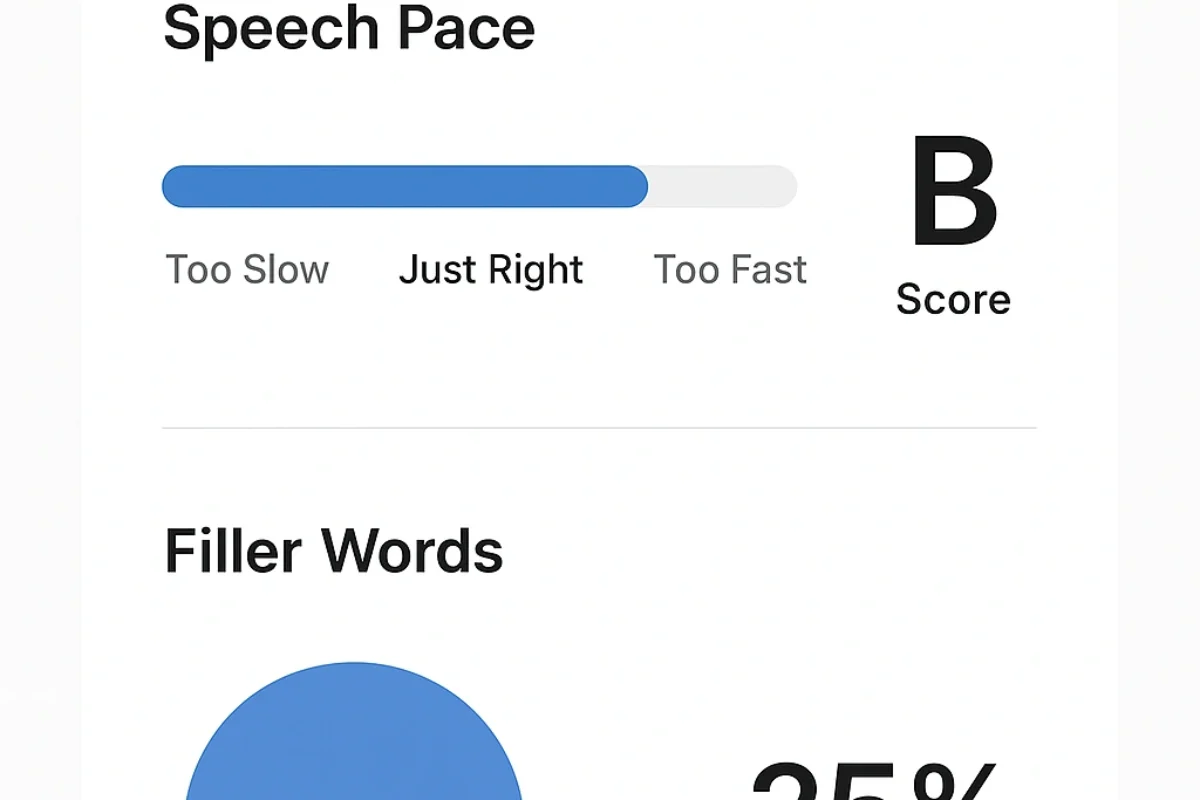
- Step 3: The Instant Feedback ReportImmediately after the session, the AI analyzes your performance and generates a detailed report. This report typically includes a full transcript of your answers, an analysis of your speech patterns, and scoring on key metrics like clarity, confidence, and relevance.

Real-Life Test: I Tried “Podium AI” to Prepare for an Interview
I had a real interview coming up, so I decided to test one of the leading mock interview tools, a platform called ‘Podium AI.’ I uploaded the job description for a ‘Content Strategist’ role, and the mock interview tools generated 10 questions, including several tricky behavioral ones. Using these mock interview tools helped me practice my answers, refine my approach, and gain confidence before the actual interview.
The experience was surprisingly realistic. The pressure of the ticking clock and the recording light made me feel the same nerves as a real interview. The feedback report was the most valuable part. It was brutally honest. It told me I spoke too fast (180 words per minute), used the word “like” 12 times, and only made eye contact with the camera 60% of the time. It also gave me a transcript of my rambling answer to “Tell me about yourself.” Seeing this data was a wake-up call. I did two more practice sessions, consciously focusing on slowing down, eliminating filler words, and looking at the camera. By the third session, my scores had improved dramatically, and I felt a hundred times more confident.
| Pros | Cons |
|---|---|
| Provides incredibly detailed, objective feedback | Can’t judge the subjective quality or creativity of your answers |
| Excellent for building confidence and reducing anxiety | The AI avatar can feel a bit uncanny or robotic |
| The custom question generation is highly relevant | Paid plans can be a bit pricey for a student budget |
Tool Showdown: The Best Mock Interview Tools of 2025
The market for interview simulators is growing. Here’s how the top (fictional) platforms compare.
| Tool | Key Feature | Pros | Cons | Best For |
|---|---|---|---|---|
| Podium AI | Advanced Feedback Analytics | In-depth analysis of speech, tone, and body language | Most expensive subscription | Data-driven candidates who want the most detailed feedback. |
| InterviewGo | Extensive Question Library | Huge library of questions for specific industries and roles | Feedback is less detailed than competitors | Candidates in specialized fields like finance or engineering. |
| PrepPal | Generous Free Tier | Offers a good number of free practice sessions per month | AI is less advanced, basic user interface | Students and job seekers on a tight budget. |
7 Common Mistakes to Avoid When Using Mock Interview Tools
Get the most out of your practice sessions by avoiding these common errors:
- Not Taking It Seriously: If you don’t treat the simulation like a real interview, you won’t get a realistic assessment of your performance. Dress the part and find a quiet, distraction-free space.
- Memorizing Your Answers: The goal is to internalize your key talking points, not to memorize a script. Sounding robotic is a major red flag for recruiters.
- Ignoring the Feedback: The feedback report is the most valuable part of the process. Don’t just look at the score; read the suggestions and consciously work on improving your weak spots in the next session.
- Only Practicing Once: Repetition is key. One practice session is better than none, but the real improvement comes from doing it multiple times.
- Using a Bad Tech Setup: Use a stable internet connection and a good webcam and microphone. Poor audio or video quality will affect the AI’s analysis.
- Reading from a Script: Don’t have notes taped to your screen. The AI can often detect eye movement, and it’s a bad habit that won’t help you in a real, in-person interview.
- Skipping the “Questions for the Interviewer” Part: Use the simulation to practice asking your own thoughtful questions at the end of the interview.
Expert Tips for Acing Your AI Practice
“Use the AI tool to perfect your ‘Tell me about yourself’ pitch. Record it, watch it back, and refine it until it’s a confident, concise, and compelling 60-second story. Nailing the first impression sets a positive tone for the entire interview.”
— Sarah Chen, Career Coach (Simulated)
- Focus on One Thing at a Time: In your first practice session, just focus on the content of your answers. In the second, focus on reducing your filler words. In the third, focus on your eye contact.
- Practice Your STAR Stories: Use the simulator to rehearse your key STAR method examples until they flow naturally.
- Watch Yourself on Mute: Review your recording with the sound off to focus solely on your body language. Are you smiling? Do you look engaged?
- Send Your Recording to a Friend: After you’ve refined your answers with the AI, send your best recording to a trusted friend or mentor for a human perspective.
Frequently Asked Questions (FAQ)
Are AI interview tools really accurate?
AI interview tools are remarkably accurate at analyzing objective metrics like your speech pace, use of filler words, and eye contact. While they can’t judge the substance of your answers like a human can, they provide invaluable, data-driven feedback on your delivery and presentation, which are critical components of a successful interview.
Can these tools help me prepare for technical interviews?
Yes, many modern platforms now include specialized modules for technical interviews. They can provide you with common coding challenges (for software roles) or case study questions (for consulting roles) and help you practice structuring your answers and explaining your thought process under pressure.
How much do mock interview tools typically cost?
The cost varies. Many tools offer a limited free version that allows you to practice with a few basic questions. Paid plans, which unlock advanced feedback, unlimited sessions, and specialized question banks, typically range from $10 to $30 per month.
Is using an AI simulator better than practicing with a friend?
They serve different purposes and are best used together. An AI simulator provides objective, data-driven feedback on your performance that a friend can’t. A friend can provide subjective feedback on the content of your answers and offer human encouragement. The ideal preparation involves using an AI tool to refine your delivery and then practicing with a person to ensure your stories land well.
How many times should I practice before a real interview?
There’s no magic number, but a good goal is to complete at least 3 to 5 full practice sessions using a mock interview tool. This is enough to build muscle memory, refine your key stories, and significantly reduce your anxiety without making your answers sound overly rehearsed.