Introduction
What Are Remote Learning Tools?

Why the Right Digital Toolkit is a Non-Negotiable
In a physical classroom, structure is provided for you. In remote learning, you have to build it yourself. The right tools are the building blocks of that structure.
They Tame the Chaos and Boost Productivity
Remote learning is a constant battle against disorganization. Digital syllabi, assignment links, research articles, and lecture notes can quickly become a chaotic mess. Tools like Notion or Todoist act as a central command center, organizing your tasks, deadlines, and notes in one place, which is proven to reduce stress and increase productivity.
They Bridge the Collaboration Gap
One of the biggest challenges of remote learning is the lack of spontaneous group work. Collaborative tools like Miro and Google Docs recreate the experience of a shared whiteboard or group table, allowing for real-time brainstorming, project planning, and peer editing, fostering a crucial sense of community and teamwork.
They Make Learning Active, Not Passive
Simply watching a two-hour lecture video is a recipe for poor retention. Effective online study aids like Quizlet and Anki turn passive consumption into active learning through digital flashcards, practice quizzes, and spaced repetition systems, techniques scientifically proven to enhance memory. For more learning strategies, explore the resources at Infoinaja.
In-Depth Review: Notion as the Ultimate Student Hub
If there’s one tool that has revolutionized remote learning for students, it’s Notion. It’s not just a note-taking app; it’s an all-in-one workspace that can replace half a dozen other apps.
As a student, my digital life was a mess of Google Docs for notes, Trello for projects, and a separate calendar for deadlines. Notion allowed me to consolidate everything into a single “Second Brain.” I created a main dashboard with a master calendar showing all my assignment due dates. Each class has its own page with a database of notes, where I can use toggle lists to create active recall questions. For my history research paper, I used the Kanban board view to track my progress from “Researching” to “Drafting” to “Final Edit.” The ability to link pages and databases means my research notes for the paper are directly linked to the relevant lecture notes. It has a learning curve, but the payoff in organization is immense.
Notion for Students: Pros & Cons
- Pros: Incredibly versatile (notes, tasks, databases), highly customizable, powerful free tier for personal use, excellent for creating a central hub.
- Cons: Steep learning curve for beginners, can be slow to load on older devices, lacks dedicated offline mode on desktop.
Comparison: The Essential Remote Learning Toolkit for 2025
No single tool does it all. A truly effective setup involves a stack of tools that work together. Here’s a breakdown of the best in each key category.
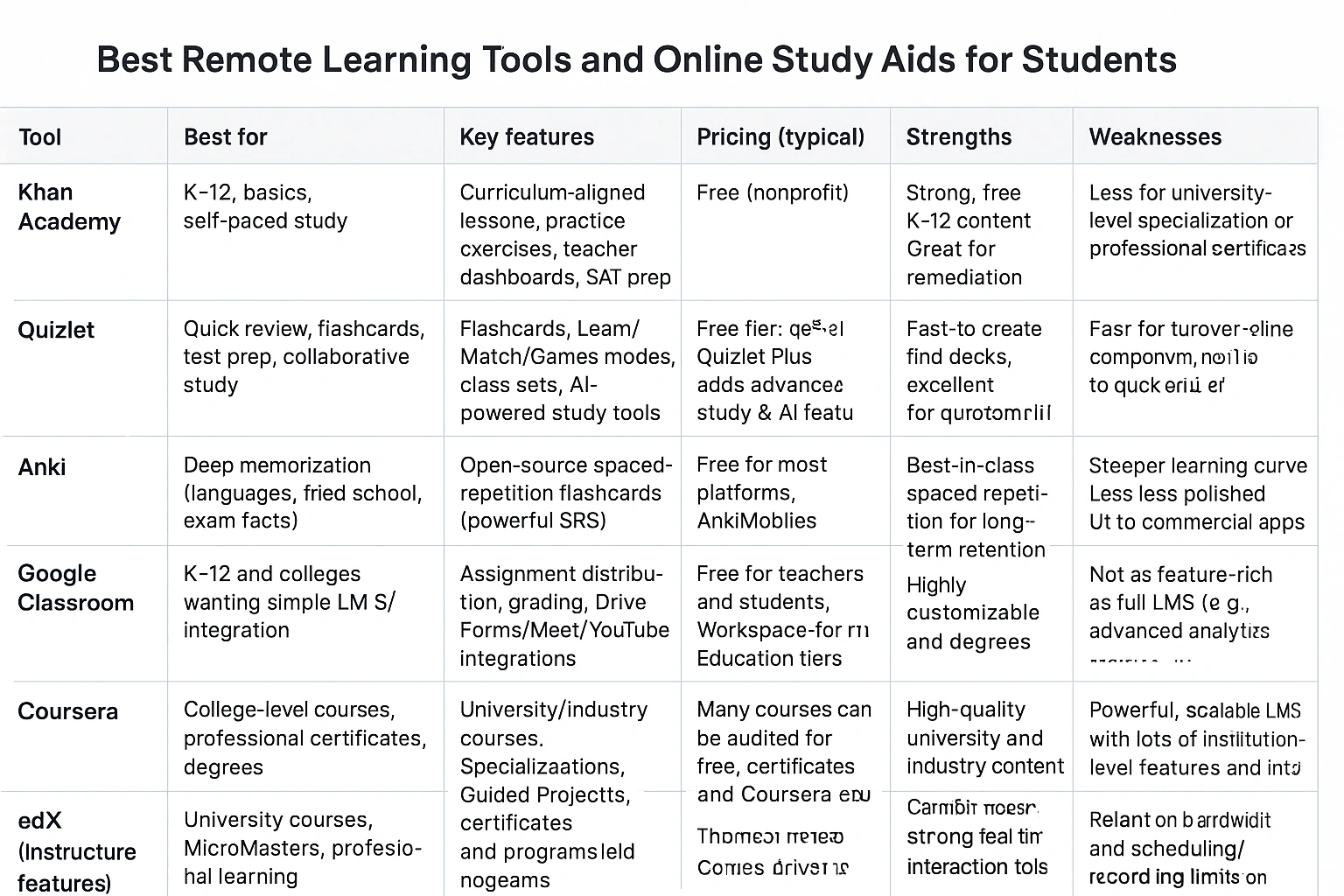
| Tool | Category | Best For |
|---|---|---|
| Notion | Organization & Note-Taking | Creating an all-in-one “second brain” to manage notes, tasks, and projects in a highly customized way. |
| Zoom | Communication | Attending live lectures, virtual office hours, and participating in group discussions with reliable video quality. |
| Quizlet | Studying & Memorization | Quickly creating digital flashcards and practice tests for memorizing key terms and concepts. |
| Miro | Collaboration | Real-time group brainstorming, mind mapping, and visual project planning on an infinite digital whiteboard. |
| Grammarly | Writing Assistance | Improving the clarity, grammar, and professionalism of essays, emails, and discussion board posts. |
Common Mistakes to Avoid with Remote Learning Tools
- Tool Overload: The trap of signing up for a dozen different apps, leading to digital clutter and confusion. It’s better to master two or three integrated tools than to dabble in ten.
- Procrastinating by “Organizing”: Spending hours customizing your Notion dashboard with fancy widgets and graphics instead of actually doing the work. A simple, functional system is better than a beautiful, unused one.
- Ignoring the Learning Curve: Jumping into a complex tool like Notion or Miro without watching a few tutorials. Investing an hour upfront to learn the basics will save you many hours of frustration later.
- Keeping Your Tools in Silos: Using separate tools for notes, tasks, and files without any connection between them. The power of a digital system comes from its ability to link related information.
Expert Tips & Best Practices

- Use Templates: Don’t start from scratch. Most popular tools have a vast library of pre-made templates designed specifically for students. Find a course planner or note-taking template and adapt it to your needs.
- Schedule “Admin Time”: Block out 30 minutes at the start or end of each week to organize your digital workspace—review your calendar, update your to-do list, and file away your notes. This keeps your system from becoming chaotic.
- Focus on the Process, Not the Tool: Remember that a tool is only as good as the learning method it supports. Use your tools to implement proven study techniques like active recall and spaced repetition.
“The biggest mistake students make is adopting tools without adopting a system. A powerful app with a chaotic workflow is just a faster way to get disorganized. First, define your process for capturing, organizing, and reviewing information, then choose the tools that fit that process,” says an education technology expert featured in Wired.
Frequently Asked Questions (FAQ)
Q: Are free remote learning tools good enough?
A: Absolutely. Many of the most powerful and popular tools, such as Notion, Google Drive, and Quizlet, offer incredibly robust free tiers that are more than sufficient for most students. It’s recommended to start with free versions to build your workflow before considering paid upgrades for specialized features.
Q: What is the single most important tool for a remote student?
A: While it varies by need, the two most critical tools are a reliable video conferencing app (like Zoom or Google Meet) for communication and a robust organizational tool (like Notion or Todoist) to manage assignments, notes, and schedules. A strong organizational system is the foundation of successful remote learning.
Q: How can I avoid getting distracted by the tools themselves?
A: To avoid distraction, turn off all non-essential notifications within your apps. Use dedicated focus tools like Forest or a website blocker during study sessions. The key is to be intentional: use the tool for its specific purpose, then close it. Don’t fall into the trap of endlessly customizing your setup instead of studying.
Q: Should my school be providing these tools?
A: Most educational institutions provide core tools, such as a Learning Management System (LMS) like Canvas or Blackboard, and often institutional accounts for video conferencing. However, personal productivity and specialized online study aids are typically the student’s responsibility to choose and manage.
Q: What’s the best way to take notes online?
A: The best way is the one you’ll stick with, but apps like Notion, Evernote, and OneNote are top contenders. They allow you to combine text, images, and links, and they sync across all your devices. The ‘active recall’ method, where you write questions and hide the answers (easily done with toggle features in these apps), is highly effective for retention Statista’s e-learning section.
Conclusion